Saturday, August 22, 2026 — When maintaining large-scale C++ systems (HTS clients, gaming servers/engines, high-frequency trading infrastructure), engineers frequently encounter a nightmarish scenario.
Days after a production deployment, an urgent crash dump (.dmp) arrives from a client. However, because the development branch has moved forward with new builds, opening the dump yields the dreaded "PDB signature does not match binary" error, leaving source lines and call stacks unresolvable.
When the original PDB was not properly archived, you don't have to give up. This guide details 4 battle-tested techniques to accurately trace crash locations at the binary and assembly level, along with permanent infrastructure prevention using SymStore symbol servers.
1. PE Header & PDB Matching Mechanism: Why Simple Rebuilds Fail
To troubleshoot symbol issues, one must first understand how debuggers (Visual Studio, WinDbg) verify binary-PDB integrity.
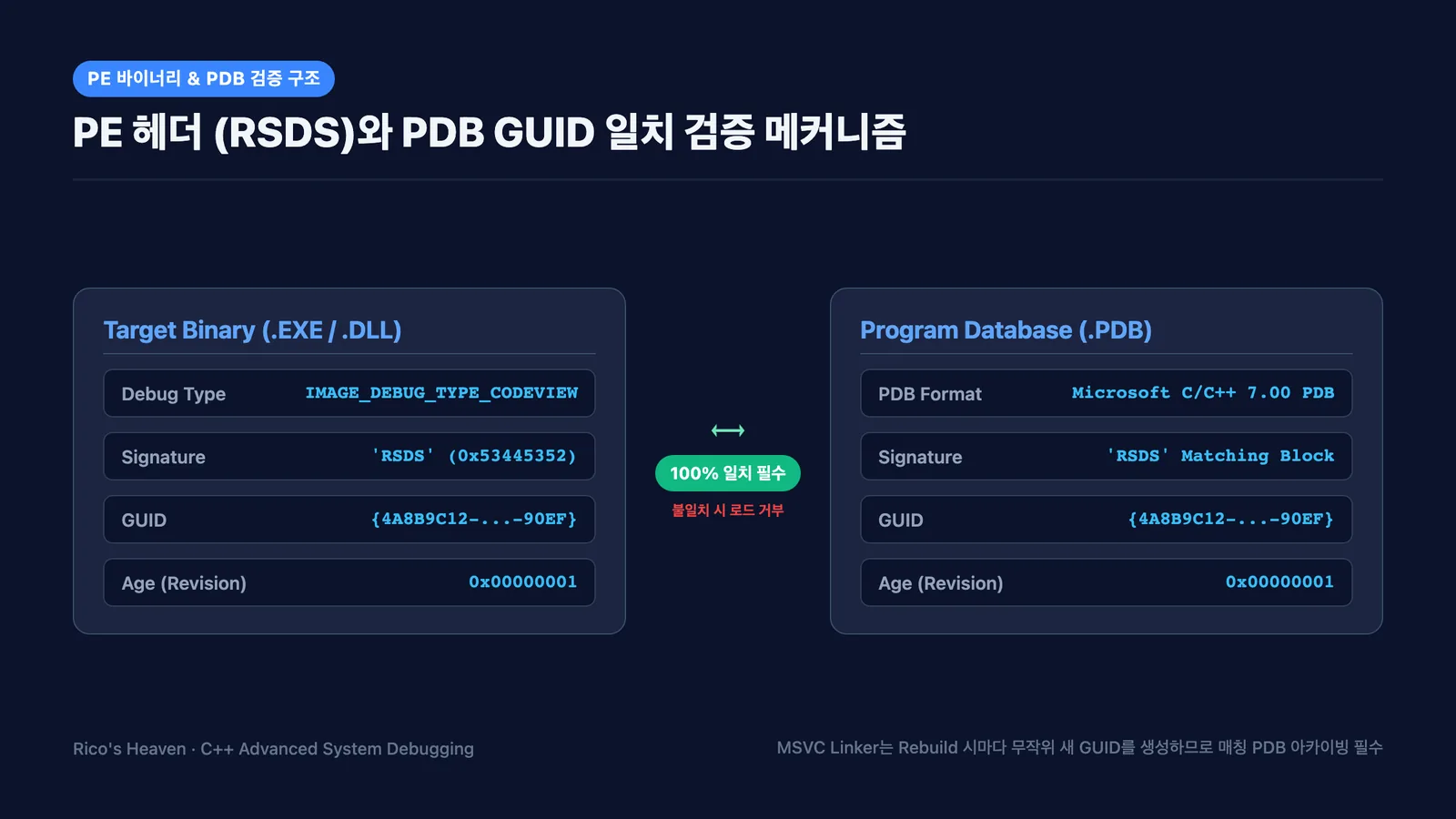
1) PE Header Debug Directory (RSDS)
Within the PE IMAGE_OPTIONAL_HEADER lies IMAGE_DIRECTORY_ENTRY_DEBUG, pointing to an array of IMAGE_DEBUG_DIRECTORY structures. The entry with type IMAGE_DEBUG_TYPE_CODEVIEW (2) contains debugging metadata.
Since Visual C++ 7.0, this structure contains the RSDS signature, a 16-byte GUID, a 4-byte Age counter, and the original PDB file path.
// CodeView debug information structure inside PE binary
struct CV_INFO_PDB70 {
    DWORD  CvSignature; // 'RSDS' (0x53445352)
    GUID   Signature;   // 128-bit unique GUID
    DWORD  Age;         // Build increment count (starts at 1)
    BYTE   PdbFileName[1]; // PDB file path at compilation
};
2) Why Even Identical Code Generates Mismatched PDBs
Even if not a single character in the source code has changed, clicking Rebuild causes the MSVC Linker (link.exe) to generate a completely new pseudo-random GUID embedded into both the binary and PDB.
Debuggers enforce a byte-for-byte match of GUID + Age. Thus, rebuilding from the exact same Git commit will still cause the debugger to reject the PDB under default settings.
2. 4 Practical Techniques to Trace Crash Locations Without Matching PDBs
Even without the matching PDB, having the deployed binary (EXE/DLL) and the dump file is sufficient to pinpoint the exact crash line through arithmetic and assembly mapping.
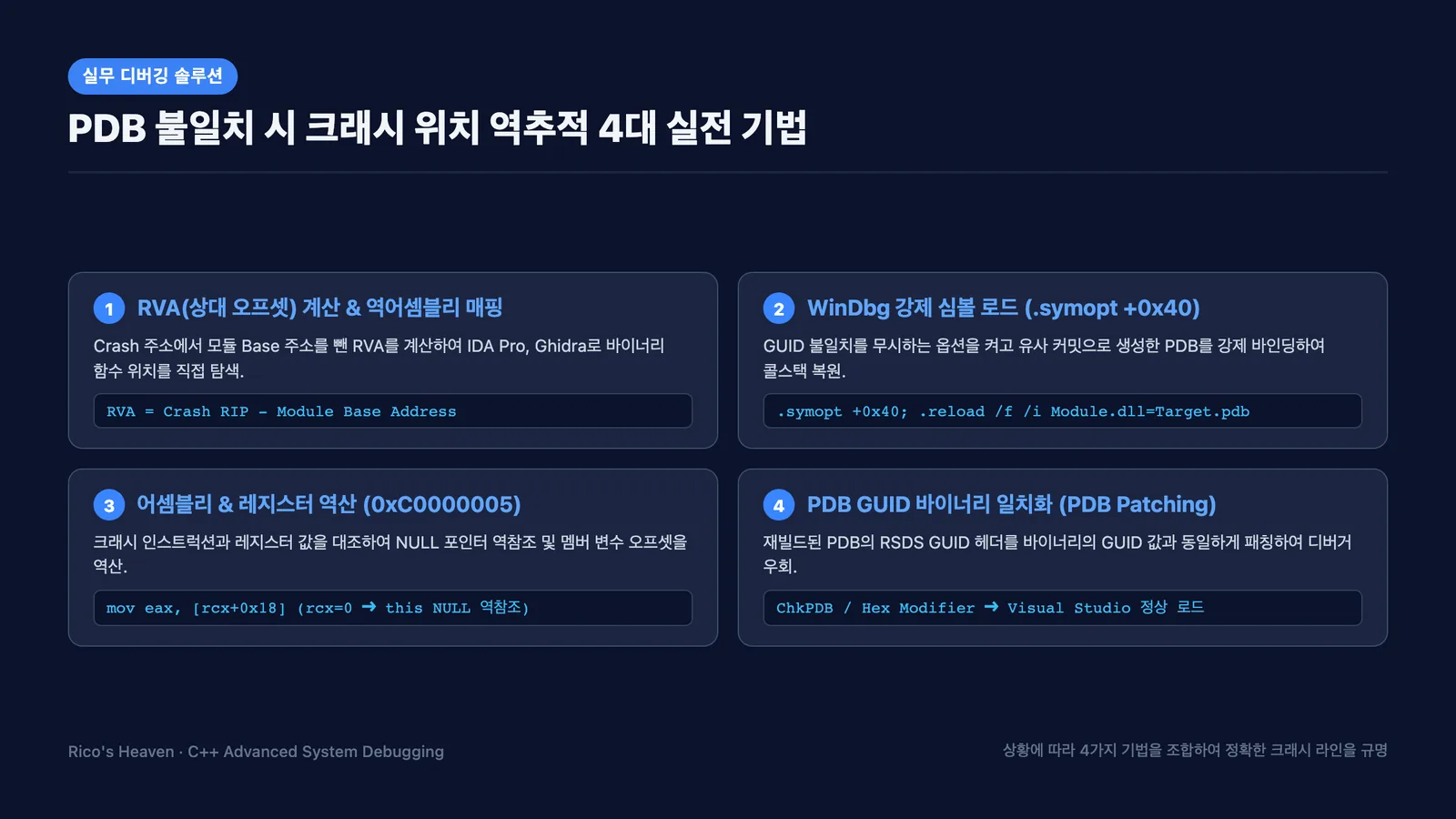
Technique 1 (RVA Tracing): Relative Virtual Address Calculation & Disassembly Mapping
The most reliable and standard method is calculating the Relative Virtual Address (RVA) and mapping it into static analysis tools (IDA Pro, Ghidra, x64dbg).
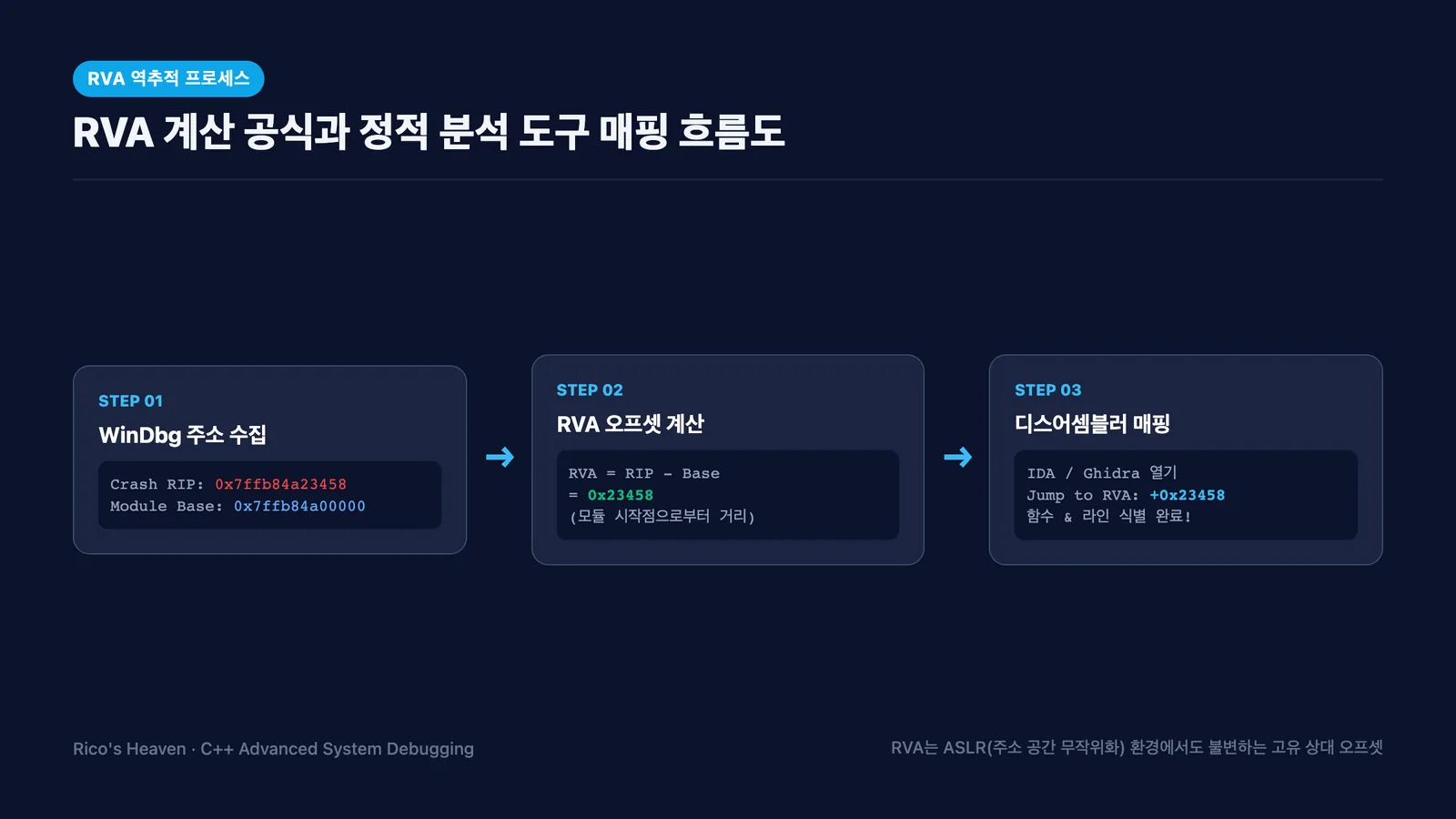
Step 1: Retrieve Crash RIP and Module Base Address in WinDbg
Load the crash dump in WinDbg and query registers and module boundaries:
0:000> r
rax=0000000000000000 rbx=00000000004ff890 rcx=0000000000000000
rdx=00000000028a1040 rsi=00000000004ff920 rdi=00000000004ff970
rip=00007ffb84a23458 rsp=00000000004ff7e0 rbp=00000000004ff820
...

0:000> lmvm HtsEngine
Browse full module list
start             end                 module name
00007ffb`84a00000 00007ffb`84b56000   HtsEngine  (deferred)
    Image path: C:\Program Files\HTS\HtsEngine.dll
    Image name: HtsEngine.dll
Step 2: Calculate RVA
- Crash Instruction Pointer (
RIP):0x00007ffb84a23458 - Module Base Address (
Base):0x00007ffb84a00000 - RVA = RIP - Base = 0x7ffb84a23458 - 0x7ffb84a00000 = 0x23458
Step 3: Navigate in IDA Pro / Ghidra
Open the deployed HtsEngine.dll in IDA Pro or Ghidra. Jump to the image base plus the RVA (e.g., 0x180000000 + 0x23458 = 0x180023458). The surrounding instructions, string references, and API calls will immediately identify the exact function and branch condition.
Technique 2 (Forced WinDbg Loading): Binding PDB via .symopt +0x40
If you can build a PDB locally from the approximate source commit, WinDbg's force-load flag can bypass the GUID check.
// 1. Enable SYMOPT_LOAD_ANYTHING (0x40) to ignore GUID/Checksum mismatches
0:000> .symopt +0x40
Symbol options are 0x30377:
  +0x00000040 - SYMOPT_LOAD_ANYTHING

// 2. Force-reload the newly built PDB onto the target module
0:000> .reload /f /i HtsEngine.dll=D:\Build\RebuiltPDB\HtsEngine.pdb

// 3. Inspect the reconstructed call stack
0:000> kn
 # Child-SP          RetAddr           Call Site
00 00000000`004ff7e0 00007ffb`84a21142 HtsEngine!CPacketHandler::OnReceivePacket+0x58 [D:\Source\PacketHandler.cpp @ 142]
01 00000000`004ff820 00007ffb`84a1a890 HtsEngine!CNetworkManager::DispatchLoop+0x120 [D:\Source\NetworkManager.cpp @ 88]
u . or uf .) to verify assembly-source alignment.
Technique 3 (Assembly & Register Inversion): Solving Access Violations (0xC0000005)
Even with zero symbols, examining the crashing instruction and register context solves over 90% of null pointer and invalid memory faults.
0:000> .ecxr
rax=0000000000000000 rbx=00000000004ff890 rcx=0000000000000000
rdx=00000000028a1040 rsi=00000000004ff920 rdi=00000000004ff970
rip=00007ffb84a23458 rsp=00000000004ff7e0 rbp=00000000004ff820
iopl=0         nv up ei pl zr na po nc
cs=0033  ss=002b  ds=002b  es=002b  fs=0053  gs=002b             efl=00010246
HtsEngine+0x23458:
00007ffb`84a23458 8b4118          mov     eax, dword ptr [rcx+18h] ds:00000000`00000018=????????
Deduction Steps:
- The faulting instruction is
mov eax, [rcx + 0x18]. - The invalid target memory address is
0x0000000000000018. - Register
rcx = 0x0000000000000000(NULL). - In x64 MSVC calling conventions,
rcxcarries thethispointer or the 1st parameter. - Conclusion: An uninitialized/null object pointer attempted to access a member variable at offset
0x18(24 bytes). - By checking the class header's memory layout at offset
0x18, you instantly identify the unassigned member variable and crashing code path.
Technique 4 (PDB Patching): Matching PDB GUID to Binary via ChkPDB
For GUI-friendly debugging in Visual Studio, you can patch the recreated PDB's header GUID to match the original binary.
- Extract Binary GUID: Run
dumpbin /headers HtsEngine.dlland readFormat: RSDS,GUID, andAge. - Patch PDB Header: Use utilities like ChkPDB or custom hex scripts to overwrite the PDB GUID/Age block.
- Visual Studio will now load the patched PDB without warning dialogs.
3. Permanent Prevention: Enterprise SymStore Symbol Server Setup
To eliminate PDB mismatch crises entirely, integrating a dedicated Symbol Server (SymStore) into the CI/CD deployment pipeline is essential.
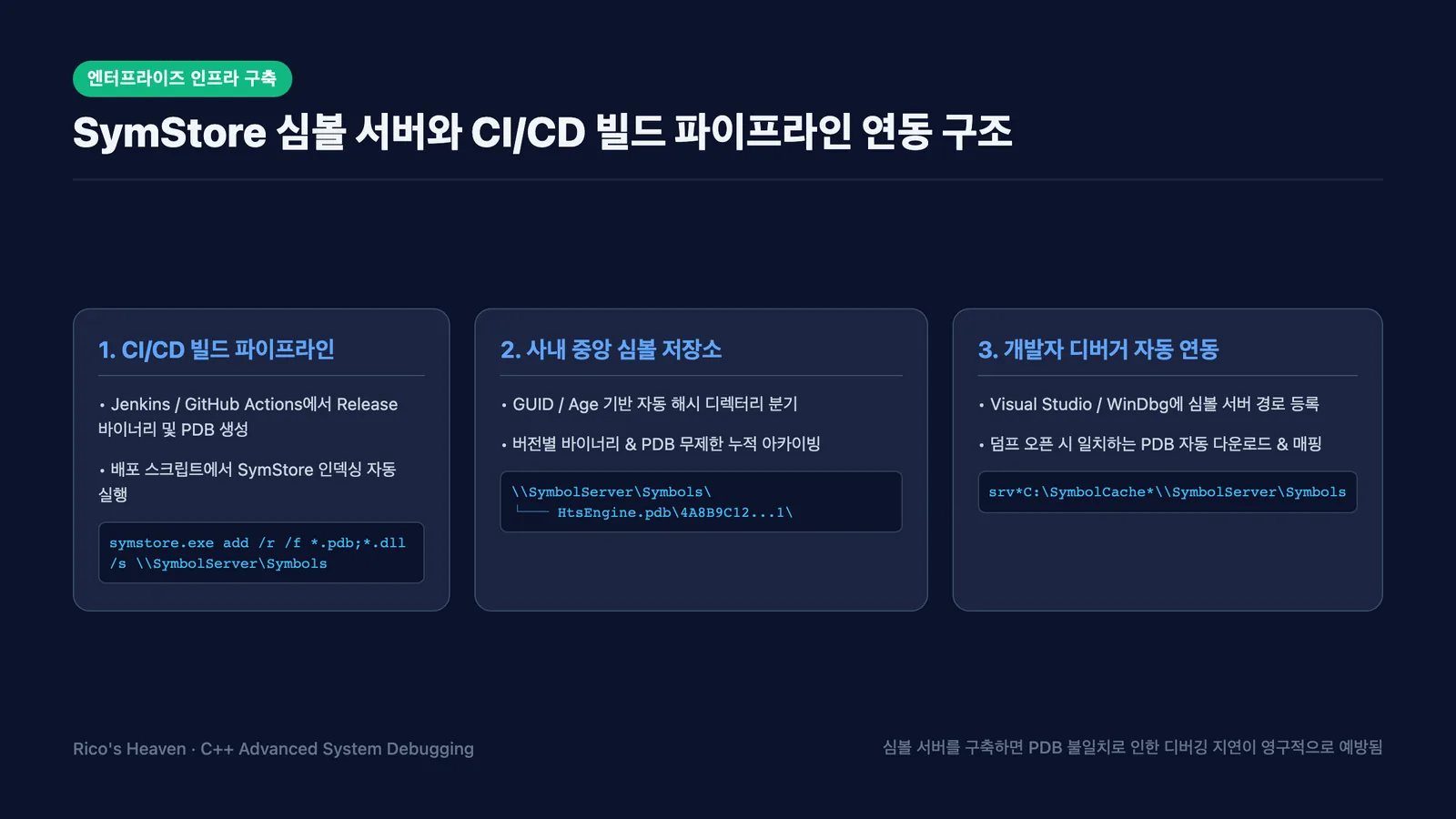
1) Automated Indexing via SymStore.exe in CI/CD
Include symstore.exe (from the Windows SDK) in your build scripts to index all release artifacts:
:: Jenkins / GitHub Actions Build Step Example
"C:\Program Files (x86)\Windows Kits\10\Debuggers\x64\symstore.exe" add ^
    /r ^
    /f "D:\Jenkins\workspace\HTS_Release\bin\*.dll;D:\Jenkins\workspace\HTS_Release\bin\*.pdb;D:\Jenkins\workspace\HTS_Release\bin\*.exe" ^
    /s "\\192.168.1.100\SymbolStore" ^
    /t "HTS_Client" ^
    /v "2026.08.22.1" ^
    /c "Release Build #142"
The symbol repository automatically partitions files by GUID/Age hashes, retaining an uncorrupted history of every deployed build.
2) Visual Studio & WinDbg Integration
Register the symbol server in your IDE to enable automatic PDB downloads whenever any historic dump file is opened.
- Visual Studio: Navigate to
Tools -> Options -> Debugging -> Symbols, add\\192.168.1.100\SymbolStore, and configure a local cache directory (e.g.,C:\SymbolCache). - WinDbg:
.sympath srv*C:\SymbolCache*\\192.168.1.100\SymbolStore*https://msdl.microsoft.com/download/symbols
4. Frequently Asked Questions (FAQ)
Q1. How do I inspect variables in Release builds when code is optimized or inlined?
Answer: When /O2 optimization eliminates local variables, inspect non-volatile registers (ebx, rsi, rdi) preserved in preceding stack frames. Compiling with /Zo (Enhanced Debugging Info for Optimized Code) significantly improves variable visibility in release dumps.
Q2. What if the Minidump lacks heap and referenced memory contents?
Answer: When invoking MiniDumpWriteDump, combine MiniDumpWithIndirectlyReferencedMemory or MiniDumpWithDataSegs flags rather than MiniDumpNormal. This bundles memory blocks referenced by pointers directly into the dump file.
5. Summary & Key Takeaways
| Scenario | Recommended Technique | Key Tools & Commands |
|---|---|---|
| PDB Completely Lost | RVA Offset Calculation & Static Disassembly | lmvm, r, IDA Pro / Ghidra |
| Rebuilt from Similar Commit | Forced WinDbg Symbol Load | .symopt +0x40, .reload /f /i |
| 0xC0000005 Access Violation | Assembly & Register Layout Inversion | .ecxr, r, Struct Memory Layout |
| Long-term Infrastructure | Enterprise SymStore Symbol Server | symstore.exe add, CI/CD Pipeline |