- [Part 1] Rebuilding an Abandoned Pomodoro App — Why 'Lo-Fi Focus Studio' and 'Focus-to-Earn'?
- [Part 2] Balancing Monetization and Fairness — Rewarded Ads & a 4-Layer Anti-Abuse Architecture
- [Part 3] "Synthetic Audio Sounds Fake" — Adopting Google Studio Field Recordings & a Multi-Channel Ambient Mixer (Current Post)
- [Part 4] Bypassing the iOS 26 JIT Memory Protection Crash & Crafting the Apple Watch Series 10 Circular UI
- [Part 5] A Timer That Never Stops — Mastering Android Doze, iOS Silent Audio Loops, and Bidirectional Watch Sync
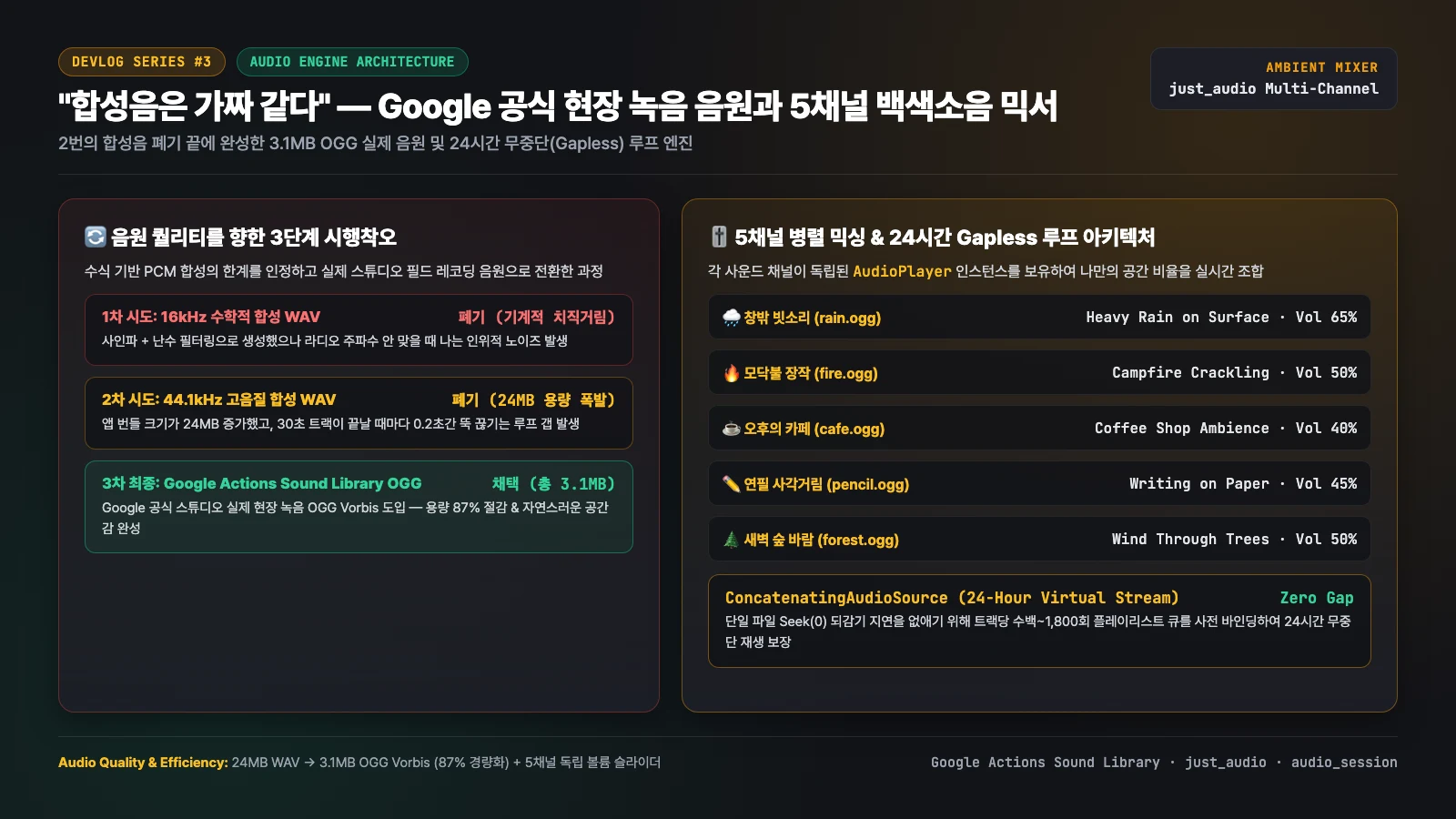
Sound is the soul of a Lo-Fi workspace. Yet our first two attempts at generating ambient soundscapes via mathematical PCM synthesis failed: they sounded like harsh radio static, bloated the app bundle by 24MB, and suffered from a jarring 0.2-second silence gap every time a track looped. In Part 3, we detail how we scrapped synthetic WAVs for Google Actions Sound Library OGG field recordings (3.1MB total, 87% smaller) and built a 5-channel parallel audio mixer with 24-hour gapless playback using
ConcatenatingAudioSource.
1. Failures #1 & #2: "Why Does Mathematical Rain Sound Like TV Static?"
When we first designed the ambient sound mixer, we thought: "Why bundle external audio recordings when we can write a Python DSP script to filter pink and brown noise into rain and campfire WAV files?"
Attempt 1 (16kHz Synthesized WAV) — Harsh Metallic Static
We filtered white noise with low-pass envelopes to mimic raindrops and crackling wood. Listening on real headphones was a rude awakening: instead of cozy rain, it sounded like an untuned FM radio hissing static. Listening for even ten seconds caused ear fatigue.
Attempt 2 (44.1kHz Multi-Layer PCM WAV) — 24MB Bloat & Loop Gaps
Suspecting low sample rates, we upgraded to 44.1kHz 16-bit PCM with multi-band modulation across 30-second loops. That triggered two new problems:
- 24MB Bundle Bloat: Just five uncompressed WAV files added 24MB to the app binary.
- The 0.2-Second Loop Gap: Every time a 30-second track reached the end and sought back to
00:00, mobile hardware decoders introduced a 100–200ms hiccup of dead silence. In a quiet room, that periodic dropout immediately broke concentration.
2. Attempt 3: Adopting Google Official Field Recordings (OGG Vorbis)
"The human ear cannot be fooled by basic random-number filters. Throw away the synthetic WAVs and use real studio field recordings."
While researching royalty-free studio-grade audio, we found the official Google Actions Sound Library. It offered authentic acoustic recordings of heavy rain on surfaces, crackling campfires, coffee shop room tone, pencil-on-paper friction, and wind through trees.
| Channel ID | Track Name | Google Actions Sound Library Source (OGG Vorbis) | File Size |
|---|---|---|---|
rain |
🌧️ Window Rain | weather/rain_heavy_loud.ogg (Real heavy rain recording) |
914 KB |
fire |
🔥 Campfire Wood | ambience/fire.ogg (Real crackling campfire) |
522 KB |
cafe |
☕ Afternoon Cafe | ambience/coffee_shop.ogg (Real cafe room ambience) |
548 KB |
pencil |
✏️ Pencil Sketching | office/writing_on_paper.ogg (Real graphite on paper) |
704 KB |
forest |
🌲 Dawn Forest Wind | weather/wind_through_trees.ogg (Real wind through leaves) |
377 KB |
By encoding in OGG Vorbis, all five studio field recordings totaled just 3.1MB—an 87% reduction from our 24MB WAVs, with vastly superior acoustic warmth.
3. 5-Channel Parallel Mixing & the '24-Hour Virtual Stream' Gapless Engine
Every user has a different ideal soundscape: some want "70% Rain + 40% Campfire", while others prefer "30% Cafe + 60% Pencil". In AmbientAudioService (lib/service/ambient_audio_service.dart), we instantiate five independent AudioPlayer instances running in parallel, each with its own real-time volume slider.
Eliminating Loop Seek Latency via 24-Hour Virtual Playlists
To eliminate the decoder buffer flush that happens when a single file seeks back to 00:00 under LoopMode.one, we leveraged just_audio's ConcatenatingAudioSource. By queuing enough asset references to span 24 continuous hours (e.g., 1,800 entries for a 48-second track with lazy preparation), the native audio pipeline prefetches the next segment into the ring buffer with zero seek gap:
// lib/service/ambient_audio_service.dart — 5-channel parallel mixer & 24h gapless queue
class AmbientAudioService extends ChangeNotifier {
  final Map<String, AudioPlayer> _players = {};

  Future<void> _configureAudioSession() async {
    final session = await AudioSession.instance;
    await session.configure(
      AudioSessionConfiguration(
        avAudioSessionCategory: AVAudioSessionCategory.playback,
        // Allow our ambient soundscape to mix alongside Apple Music / YouTube / Spotify!
        avAudioSessionCategoryOptions:
            AVAudioSessionCategoryOptions.mixWithOthers,
        androidAudioAttributes: const AndroidAudioAttributes(
          contentType: AndroidAudioContentType.music,
          usage: AndroidAudioUsage.media,
        ),
        androidAudioFocusGainType:
            AndroidAudioFocusGainType.gainTransientMayDuck,
      ),
    );
  }

  Future<AudioPlayer> _getOrCreatePlayer(AmbientTrack track) async {
    if (_players.containsKey(track.id)) {
      return _players[track.id]!;
    }
    final player = AudioPlayer();

    // Eliminate single-file seek(0) latency by binding a 24-hour
    // ConcatenatingAudioSource playlist with native gapless prefetching
    final children = List<AudioSource>.generate(
      track.repeatCountFor24Hours,
      (_) => AudioSource.asset(track.assetPath),
    );
    final playlist = ConcatenatingAudioSource(
      useLazyPreparation: true,
      children: children,
    );

    await player.setAudioSource(playlist, preload: true);
    await player.setLoopMode(LoopMode.all);
    await player.setVolume(track.volume);
    _players[track.id] = player;
    return player;
  }
}
By enabling AVAudioSessionCategoryOptions.mixWithOthers, users can also play their favorite Lo-Fi beats on Spotify or Apple Music while layering our rain and campfire channels underneath.
4. Up Next: Surviving the iOS 26 Real-Device Crash (`brk #0xf00d`)
Everything ran smoothly on Android and Galaxy Watch. Then we plugged in a physical iPhone running iOS 26.3.1 paired with an Apple Watch Series 10 (watchOS 26.2) and hit Run in Xcode. The app flashed a white screen and crashed within 0.1 seconds with EXC_BAD_ACCESS (SIGKILL) / brk #0xf00d.
In [Part 4: Bypassing the iOS 26 JIT Memory Protection Crash & Crafting the Apple Watch Series 10 Circular UI], we dissect how iOS 26's TXM (Trusted Execution Monitor) blocks Flutter Debug JIT memory pages and how we engineered the native SwiftUI circular UI for Apple Watch Series 10.