- [Part 1] Rebuilding an Abandoned Pomodoro App — Why 'Lo-Fi Focus Studio' and 'Focus-to-Earn'?
- [Part 2] Balancing Monetization and Fairness — Rewarded Ads & a 4-Layer Anti-Abuse Architecture
- [Part 3] "Synthetic Audio Sounds Fake" — Adopting Google Studio Field Recordings & a Multi-Channel Ambient Mixer
- [Part 4] Bypassing the iOS 26 JIT Memory Protection Crash & Crafting the Apple Watch Series 10 Circular UI
- [Part 5] A Timer That Never Stops — Mastering Android Doze, iOS Silent Audio Loops, and Bidirectional Watch Sync (Current Post)
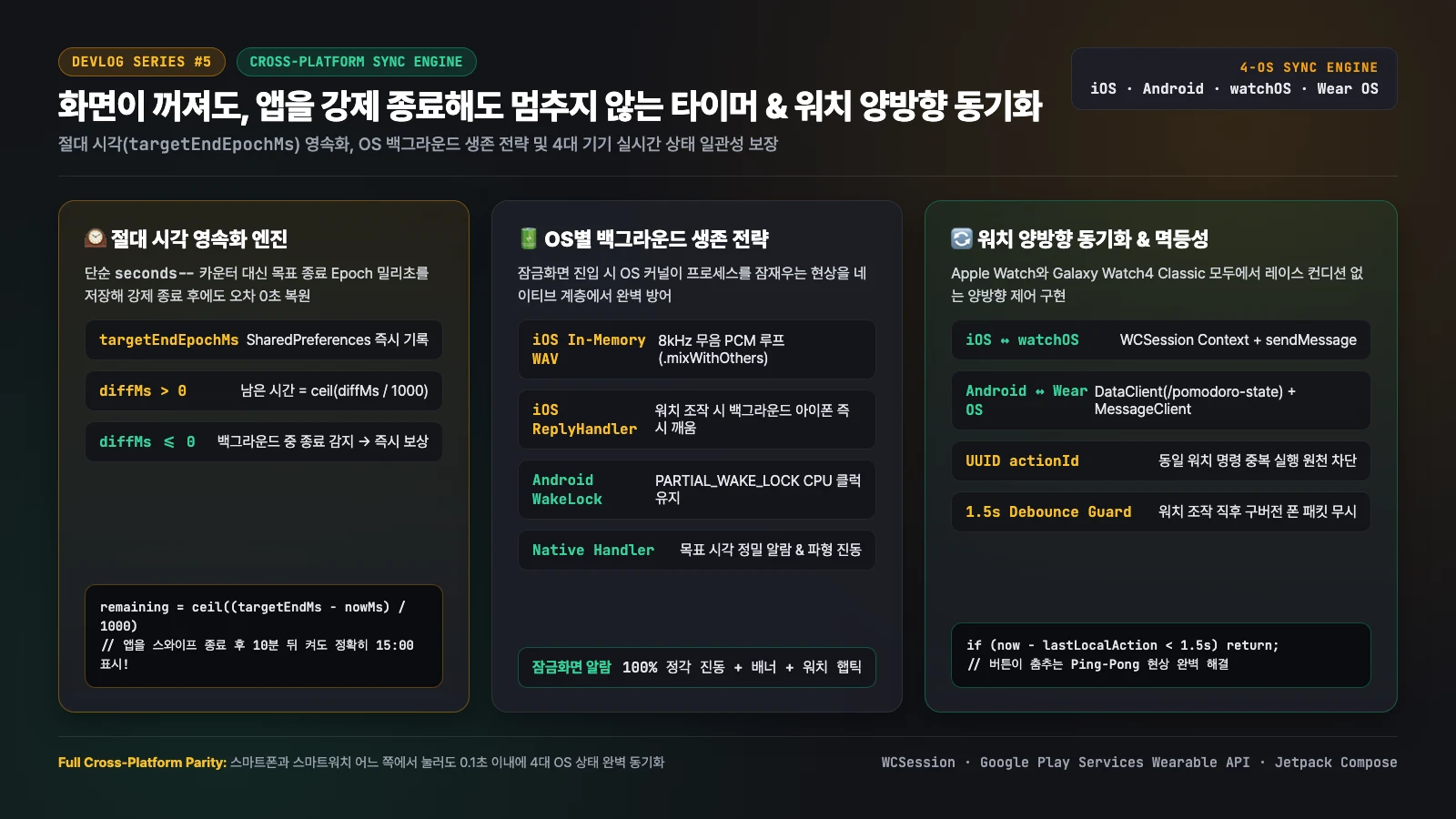
The lifeblood of a timer app is unconditional reliability: time must flow accurately and alarms must fire on the exact second whether the screen is locked or the app is swipe-killed. In this final installment (Part 5), we open-source our wall-clock persistence engine (
targetEndEpochMs), OS-specific background survival strategies (iOS in-memory silent PCM WAV loops & Android PARTIAL_WAKE_LOCK), and our race-condition-free bidirectional sync protocol spanning iPhone, Apple Watch (WCSession), Android, and Galaxy Watch (Wearable Data Layer).
1. Why Naive Timers Freeze When You Lock the Screen or Kill the App
Tutorial timers typically rely on Timer.periodic(Duration(seconds: 1), (_) => remainingSeconds--). In production mobile environments, that naive approach fails in two ways:
- Background Thread Suspension: Within seconds of locking the screen, both iOS and Android suspend the Dart VM event loop to save battery.
- State Loss on Swipe-Kill: If the user swipes the app away from the recent apps switcher, in-memory counters evaporate and reset to
25:00on next launch.
The Solution: Persist the Absolute Target Epoch (targetEndEpochMs), Never Just a Counter
Whenever a session starts, TimerService (lib/service/timer_service.dart) computes the exact future wall-clock timestamp (_targetEndEpochMs = nowMs + remainingSeconds * 1000) and flushes it immediately to SharedPreferences:
// lib/service/timer_service.dart — Wall-clock persistence & swipe-kill recovery
Future<void> _restorePersistedTimerState() async {
  final prefs = await SharedPreferences.getInstance();
  final savedRunning = prefs.getBool('v2_timer_is_running') ?? false;
  final savedTargetEndMs = prefs.getInt('v2_timer_target_end_ms') ?? 0;

  if (savedRunning && savedTargetEndMs > 0) {
    final nowMs = DateTime.now().millisecondsSinceEpoch;
    final diffMs = savedTargetEndMs - nowMs;

    if (diffMs > 0) {
      // Case A: Target time is still in the future -> resume seamlessly with zero drift!
      _remainingSeconds = (diffMs / 1000).ceil();
      _targetEndEpochMs = savedTargetEndMs;
      _isRunning = true;
      _startInternalTicker();
    } else {
      // Case B: Target time passed while the app was killed -> complete & award ticket immediately!
      _remainingSeconds = 0;
      _isRunning = false;
      _handleSessionCompletion(completedWhileBackgrounded: true);
    }
  }
}
With this design, a user can start a 25-minute timer, force-close (swipe kill) the app, and reopen it 10 minutes later to see the timer ticking down from 15:00 with zero drift.
2. Lock-Screen Survival: iOS In-Memory Silent WAV Loop vs. Android WakeLock
Recovering state on reopen is only half the battle. While the phone screen is locked, the alarm and vibration must fire on the exact second, and the companion smartwatch must receive live updates. We built native background engines tailored to each OS kernel:
| Capability | iOS (AppDelegate.swift) |
Android (MainActivity.kt) |
|---|---|---|
| Background Keep-Alive | In-memory 8kHz silent PCM WAV loop (.playback + .mixWithOthers) |
PowerManager.PARTIAL_WAKE_LOCK + Native Handler.postDelayed |
| Lock-Screen Alarm | UNTimeIntervalNotificationTrigger + AudioServicesPlayAlertSound(1005) |
RingtoneManager(USAGE_ALARM) + custom VibrationEffect waveform |
| Watch-Triggered Wakeup | Watch calling sendMessage(..., replyHandler:) wakes background iOS app |
MessageReceiverService & DataClient wake the host process |
iOS: Generating a 1-Second Silent PCM WAV in Memory
On iOS, locking the screen suspends standard app processes within seconds, severing live WCSession ticks to the Apple Watch. In AppDelegate.swift, whenever the timer is actively running, we synthesize a tiny 1-second 8kHz silent PCM WAV buffer directly in RAM (at volume 0.0 with .mixWithOthers) and loop it, keeping the process alive without interrupting any external music:
// ios/Runner/AppDelegate.swift — In-memory silent WAV keep-alive during active countdowns
private func updateBackgroundKeepAlive(isRunning: Bool) {
    if isRunning {
        guard !isKeepAliveActive else { return }
        do {
            let audioSession = AVAudioSession.sharedInstance()
            try audioSession.setCategory(.playback, options: [.mixWithOthers])
            try audioSession.setActive(true)
            if silentKeepAlivePlayer == nil {
                silentKeepAlivePlayer = try AVAudioPlayer(data: Self.makeSilentWavData())
                silentKeepAlivePlayer?.numberOfLoops = -1
                silentKeepAlivePlayer?.volume = 0.0
                silentKeepAlivePlayer?.prepareToPlay()
            }
            silentKeepAlivePlayer?.play()
            isKeepAliveActive = true
        } catch {}
    } else {
        guard isKeepAliveActive else { return }
        silentKeepAlivePlayer?.pause()
        isKeepAliveActive = false
    }
}
Android: Partial WakeLock & Native Alarm Handler
On Android, Doze mode throttles CPU timers when the screen turns off. In MainActivity.kt, we acquire a bounded PARTIAL_WAKE_LOCK while a session is running and schedule a native main-thread Handler callback for targetEndMs that triggers an alarm-channel ringtone (AudioAttributes.USAGE_ALARM) and a multi-pulse vibration waveform (0, 400, 200, 400, 200, 600ms).
3. 4-Device Bidirectional Synchronization & Eliminating 'Ping-Pong' Race Conditions
Finally, a user should be able to start a session on their phone, glance at their wrist, and tap Pause (⏸), Resume (▶), Reset (↺), or Skip (⏭) on their Apple Watch or Galaxy Watch to control the phone in their pocket within 100ms.
2. Generate UUID actionId & start 1.5s debounce guard Watch->>Native: Dual-Channel Dispatch
• Real-time: sendMessage (with replyHandler)
• Persistent: updateApplicationContext / PutDataMapRequest Native->>Native: Verify idempotency via isNewWatchAction(actionId)
& update WakeLock / silent keep-alive Native->>Dart: MethodChannel.invokeMethod("sync_from_watch", payload) Dart->>Dart: Synchronize targetEndEpochMs & session state! Note over Watch,Dart: [Case 2] Phone app resumes after background watch interaction Dart->>Native: onResume -> invokeMethod("checkPendingWatchSync") Native-->>Dart: Return latest unapplied watch payload (Zero drift)
Engineering Highlight 1: Dual-Channel Dispatch (Real-Time + Persistent State)
Both Apple's WatchConnectivity and Google's Wearable Data Layer API provide two distinct transport mechanisms:
- Real-Time Messaging (
sendMessage/MessageClient): Delivers sub-100ms packets when both devices are reachable (and on iOS, invokingsendMessagewith a non-nilreplyHandlerwakes the companion iPhone app in the background!). - State Context (
updateApplicationContext/DataClient): Persists the latest state snapshot in the OS daemon so the companion app immediately receives the latest state when launched later.
We send lightweight per-second ticks (isTickOnly: true) exclusively over the real-time channel, while every state transition (Start, Pause, Reset, Skip, Session Complete) writes to both channels simultaneously.
Engineering Highlight 2: Solving the Button 'Ping-Pong' Race Condition
During early testing of bidirectional sync, tapping Pause (⏸) on the watch caused the button to briefly flip back to Running (▶) 200ms later before pausing again—a classic distributed race condition. While the watch's Pause packet was in flight to the phone, an older isRunning: true tick packet sent by the phone 100ms earlier arrived at the watch and overwrote the local state.
We eliminated this race condition completely using two mechanisms across Swift and Kotlin: (1) UUID actionId idempotency tracking in persistent storage, and (2) a 1.5-second local action debounce window that ignores stale in-flight phone packets right after a wrist tap:
// android/wearrico/.../MainActivity.kt — Galaxy Watch (Wear OS) bidirectional sync & race guard
private fun applyPayload(payload: Map<String, Any>) {
    val completed = (payload["sessionCompleted"] as? Boolean) ?: false
    if (completed) {
        WatchDataHolder.playCompletionHaptics(this)
    }
    if (!payload.containsKey("sessionState") && !payload.containsKey("isRunning")) {
        return
    }
    // 🛡️ [1.5s Debounce Guard] Ignore stale in-flight phone packets arriving within 1.5s
    // of a local watch button press to prevent UI ping-pong!
    if (!completed && System.currentTimeMillis() - lastLocalActionMs < 1500L) {
        return
    }
    // ... Apply synchronized state & targetEndEpochMs
}

private fun pushWatchStateToPhone() {
    val nowMs = System.currentTimeMillis()
    lastLocalActionMs = nowMs
    // 🛡️ [Idempotency] Tag every watch command with a unique UUID actionId
    lastActionId = UUID.randomUUID().toString()
    saveLocalWatchState()

    val payloadObj = JSONObject().apply {
        put("command", "sync_from_watch")
        put("actionId", lastActionId)
        put("sessionState", sessionState.value)
        put("isRunning", isRunning.value)
        put("remainingSeconds", remainingSeconds.intValue)
        put("totalSeconds", totalSeconds.intValue)
        put("targetEndEpochMs", targetEndEpochMs.longValue)
        put("updatedAtMs", nowMs)
    }
    val bytes = payloadObj.toString().toByteArray(Charsets.UTF_8)

    // 1. Real-time MessageClient dispatch + 2. Persistent DataClient snapshot
    Wearable.getNodeClient(this).connectedNodes.addOnSuccessListener { nodes ->
        nodes.forEach { node ->
            Wearable.getMessageClient(this).sendMessage(node.id, "/pomodoro-command", bytes)
        }
    }
    val putReq = PutDataMapRequest.create("/pomodoro-watch-sync").apply {
        dataMap.putString("payload_json", payloadObj.toString())
        dataMap.putLong("timestamp", nowMs)
    }.asPutDataRequest().setUrgent()
    Wearable.getDataClient(this).putDataItem(putReq)
}
4. Epilogue: Four Operating Systems, One Seamless Focus Experience
What began a year ago as an abandoned white-screen timer prototype has been reborn in v2.0 as a full-stack cross-platform product:
- Lo-Fi Focus Studio UI: A warm charcoal, amber, and emerald 4-tab workspace designed for zero eye strain
- Focus-to-Earn & 4-Layer Security: A behavioral-economics weekly lottery loop backed by opt-in rewarded ads and Supabase PostgreSQL
SECURITY DEFINERRPC verification - Studio Ambient Audio Engine: 3.1MB of authentic Google Actions Sound Library OGG field recordings powering a 5-channel 24-hour gapless mixer
- 4-OS Native Integration: Hardware-verified on iPhone (iOS 26.3.1), Apple Watch Series 10 (watchOS 26.2), Android, and Galaxy Watch4 Classic (Wear OS) with sub-100ms bidirectional sync
Building a demo timer that ticks on an active screen takes an afternoon. Engineering a cross-platform timer that survives OS sleep states, swipe-kills, kernel JIT protections, and bidirectional wrist synchronization across four operating systems is a deeply rewarding systems challenge. I hope this 5-part series serves as a practical reference for fellow engineers building across Flutter, iOS, watchOS, Android, and Wear OS!