In ultra-high-speed financial trading software like Home Trading Systems (HTS), market opening moments or extreme market volatility trigger sudden surges where thousands of real-time packets flood in per second. In conventional architectures, firing a PostMessage to the UI window for every incoming packet quickly exhausts the Windows message queue, leading to complete UI freezing or application crashes.
To solve this fundamental challenge, this post records the architectural journey of introducing a centralized DataManager, implementing Adaptive Throttling at the communication module (MngSB) layer to dynamically adjust cooldown periods, and fusing it with a Trailing Edge Flush mechanism to eliminate stale data loss.
1. Background & Problem: UI Freezing During Market Surges
When the market opens or critical economic news breaks, an immense volume of real-time execution and quote packets floods into the client system every second.
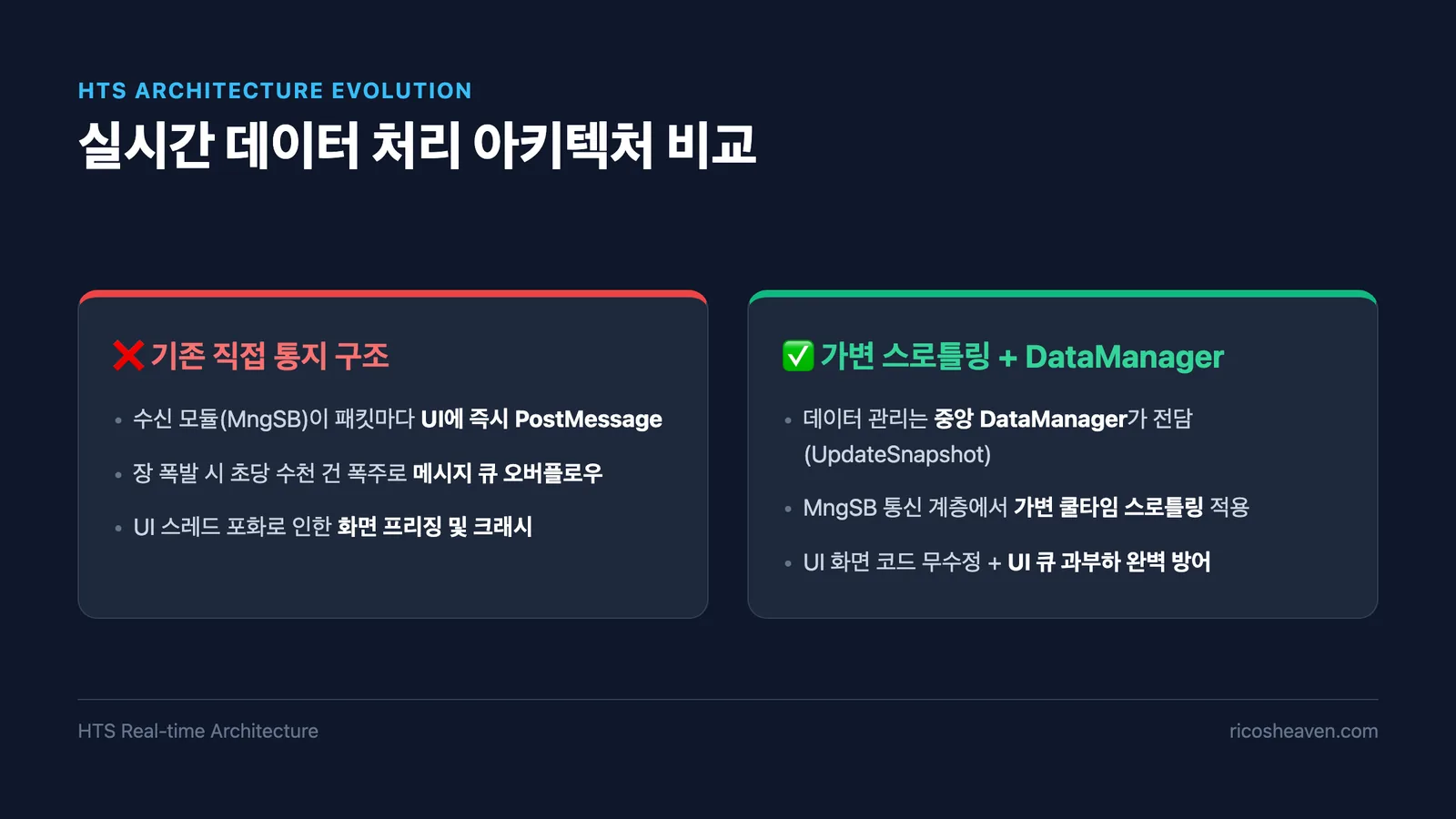
In the legacy HTS architecture, as soon as the communication receiver module (MngSB) parsed a quote packet, it immediately invoked PostMessage to the respective UI window handle to trigger screen rendering.
However, dispatching PostMessage for thousands of packets per second created severe systemic bottlenecks:
- Message Queue Overflow: The Windows main UI thread could not process the overwhelming influx in time, rapidly saturating the message queue.
- UI Freezing & Crashes: Essential user interactions (mouse clicks, menu navigation, order entry) became unresponsive, causing screens to freeze or crash entirely.
- Redundant Over-Rendering: The human eye cannot perceive numbers flickering thousands of times a second, wasting valuable CPU/GPU cycles.
To address this at its architectural roots, we embarked on designing a new architecture centered around a DataManager that consolidates market data and controls real-time UI notification pressure.
2. Architectural Decision: Where to Control the Load?
The initial idea was to have the centralized DataManager directly subscribe to real-time feeds from the communication layer and let UI screens poll data as needed.
However, dozens of existing UI view classes were deeply coupled with MngSB for subscription registration and response handling. Refactoring this entire dependency chain would have required sweeping modifications across almost all UI screens, posing unacceptable risks.
Consequently, we established a pragmatic compromise architecture that decoupled concerns without breaking existing view classes:
- Screen Subscription Logic: Preserved as-is (leveraging
MngSB) - Data Processing & Snapshot Management: Dedicated to
DataManager(viaUpdateSnapshot) - UI Notification (PostMessage): Maintained in
MngSB, but rate-limited via Publisher-level Throttling
With this design, we shielded the UI from message flooding entirely within the communication layer, without modifying a single line of UI view code.
3. Exploring Alternatives: UI Dirty Flag vs. Publisher Throttling
To mitigate excessive UI rendering load, we evaluated two distinct implementation strategies.
Alternative 1: UI Dirty Flag & Invalidate()
In this approach, DataManager updates memory data and simply calls Invalidate() on target window classes, leaving it to the OS to trigger WM_PAINT when idle.
- Limitation: Not all HTS screens render custom graphics via
OnPaint(). Many screens rely on setting values directly to individual sub-controls (Edit, Static, Grid controls viaSetItemText, etc.), which cannot be refreshed byInvalidate()alone. - Tight Coupling:
DataManagerwould need to maintain pointers to every UI class instance, creating severe coupling and lifecycle management issues.
Alternative 2: Publisher (MngSB) Throttling (Selected)
In this model, the communication module (MngSB) enforces a cooldown window when dispatching PostMessage to UI handles.
- Advantage: Zero modifications required in UI view classes; traffic control is cleanly encapsulated within the communication layer.
| Evaluation Criterion | Alt 1: UI Dirty Flag + Invalidate() | Alt 2: MngSB Publisher Throttling (Selected) |
|---|---|---|
| Scope of Modification | Massive changes across all UI screens | Isolated to MngSB (Zero UI changes) |
| Control Compatibility | Custom-drawn views only (SetItemText failure) | 100% compatible with all standard/custom controls |
| Coupling Degree | Tight coupling (DataManager ↔ UI) | Loose coupling (Clean Separation of Concerns) |
| Control Location | Distributed at Consumer (UI) level | Centralized at Publisher (MngSB) level |
4. Key Challenges: Adaptive Cooldown & Preventing Stale Data
While publisher throttling was the right direction, a naive fixed-cooldown mechanism introduced two critical dilemmas:
- Responsiveness Dilemma: If the cooldown is fixed too high (e.g., 200ms), UI updates feel sluggish during normal, low-traffic periods.
- Trailing Edge Loss (Critical): If an incoming packet is dropped during an active cooldown window and turns out to be the final trade tick of that session, the UI remains permanently frozen on outdated data.
To solve both issues simultaneously, we fused Adaptive Throttling with a Trailing Edge Flush mechanism.
4.1 Adaptive Throttling
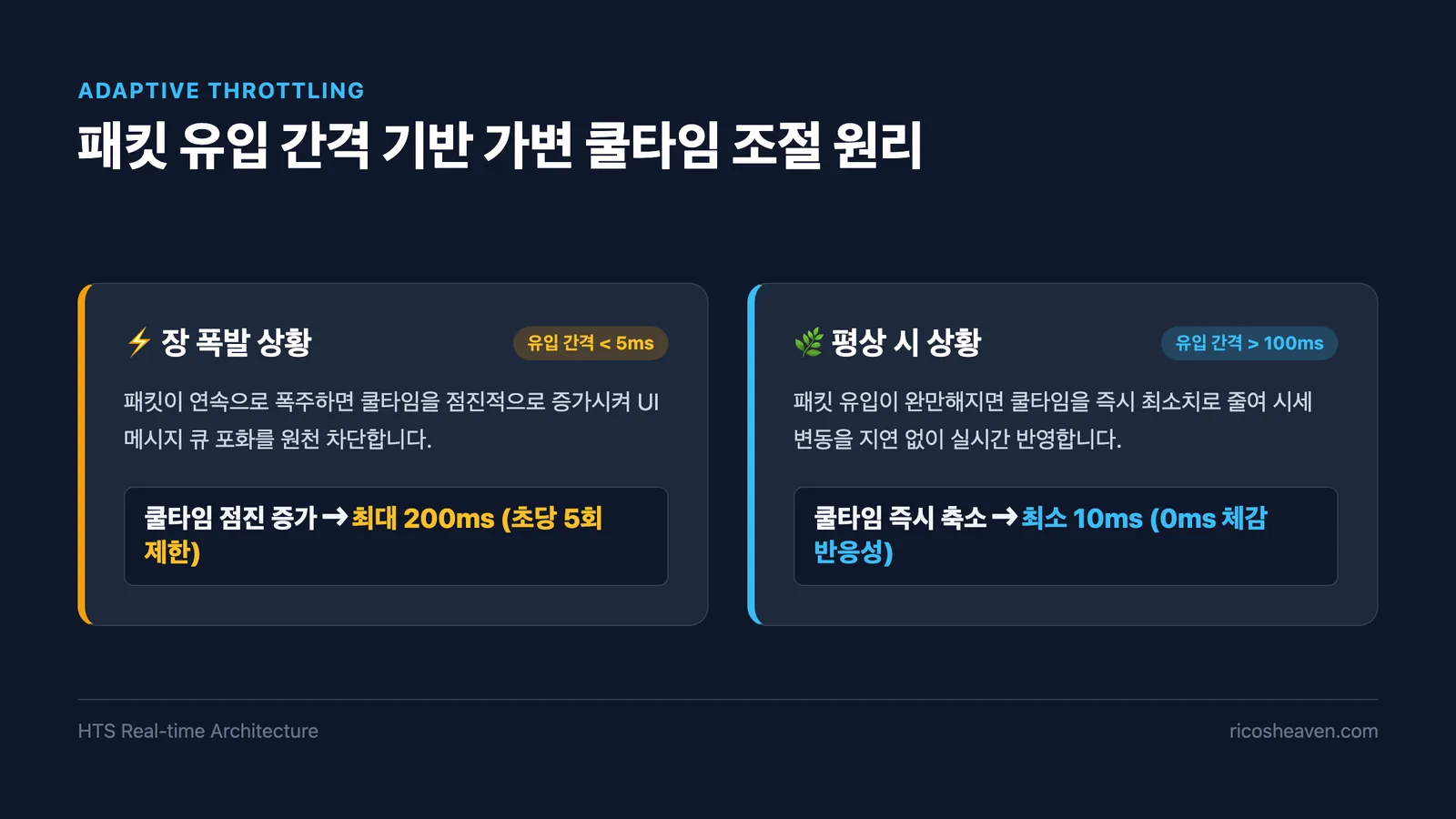
By measuring the elapsed interval between incoming packets (dwElapsed) in real time, the cooldown dynamically scales:
- During Market Surges (Packet Interval < 5ms): The cooldown progressively expands up to 200ms (~5 updates/sec), fully safeguarding the UI message queue.
- During Normal Conditions (Packet Interval > 100ms): The cooldown immediately drops to its minimum (10ms), delivering instantaneous (perceived 0ms) UI updates.
4.2 Trailing Edge Flush (Flushing Residual Packets)
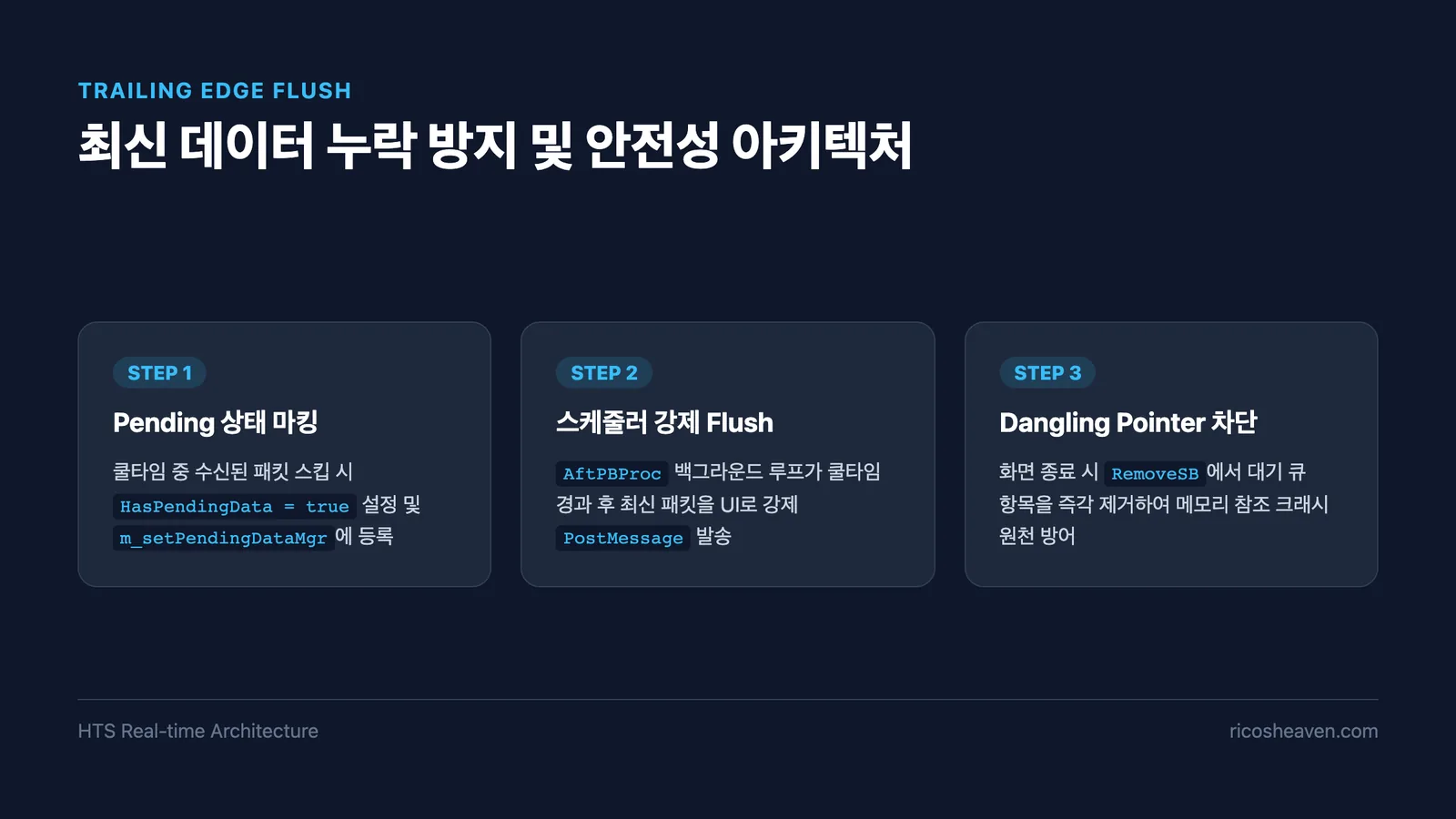
To guarantee that throttled latest data is never left stale, we leveraged the existing background scheduler (AftPBProc loop) inside MngSB:
- Whenever a notification is skipped due to throttling,
HasPendingData = trueis flagged, and the item is registered into them_setPendingDataMgrset (queue). - As the background scheduler loops, it inspects this pending set and forcefully executes a Flush
PostMessageas soon as the cooldown window expires. - When a UI screen is destroyed (
RemoveSB), the entry is immediately purged from the pending queue, completely preventing crashes from Dangling Pointers.
5. Episode: A Terrifying File Corruption & Miracle Recovery
During the implementation of this logic, a heart-stopping incident occurred.
While running an automated regex script to replace legacy notification patterns in MngSB.cpp (~1,200 lines of critical communication code), an unexpected character encoding mismatch stripped every newline character (\r\n), collapsing the entire 1,200-line codebase into a single, corrupted line.
Because the file was not open in the IDE when the external script executed,
Ctrl+Z (Undo) was completely unavailable.
Refusing to panic, we performed a thorough search across local backup directories and miraculously located an identical MngSB.cpp file archived 5 months earlier in an auxiliary test project. By methodically reconciling line-by-line diffs, we restored the baseline source code and safely ported the new adaptive throttling and trailing edge flush algorithms.
6. Conclusion: Achieving Both Responsiveness and Stability
Through disciplined architectural design and overcoming unexpected hurdles, the final real-time processing engine achieved exceptional production metrics:
- Normal State Responsiveness: Instantaneous 0ms perceived UI update latency during normal trading.
- Surge State Stability: Zero UI stuttering or freezes even under thousands of ticks per second.
- Data Integrity: 100% guaranteed reflection of final trade ticks via Trailing Edge Flush.
- Maintainability: Clean Separation of Concerns (SoC) with zero modifications to dozens of UI View classes.
In mission-critical financial trading applications where latency and UX must coexist, dynamic adaptive control coupled with background flush guarantees provides a robust, proven architectural blueprint.
7. Frequently Asked Questions (FAQ)
SetItemText rather than custom OnPaint() rendering. Furthermore, having DataManager manage pointers to every UI screen would introduce severe tight coupling. Throttling at the communication layer isolated the control logic cleanly.
RemoveSB, the destroyed handle is immediately removed from m_setPendingDataMgr, preventing the background scheduler from attempting to post messages to invalid window handles.