Documenting my automation experiments on Wednesday, August 19, 2026.
One of the most tedious parts of preparing executive presentations and business reports is adhering strictly to corporate template guidelines. Between color palettes, typography, header sizes, line heights, and padding rules, manual formatting wastes countless hours. 😫
Vaguely prompting an LLM to "follow our corporate style" rarely works. The most reliable engineering solution is to reverse-engineer existing PPTX templates into structured, machine-readable 'JSON Style Guides' containing exact design tokens and layout rules.
1. Why Extract a JSON Style Guide from PPTX?
Anyone who has experimented with AI presentation tools knows the frustration: while text generation is proficient, layouts collapse and brand consistency evaporates when transferring content into master slides.
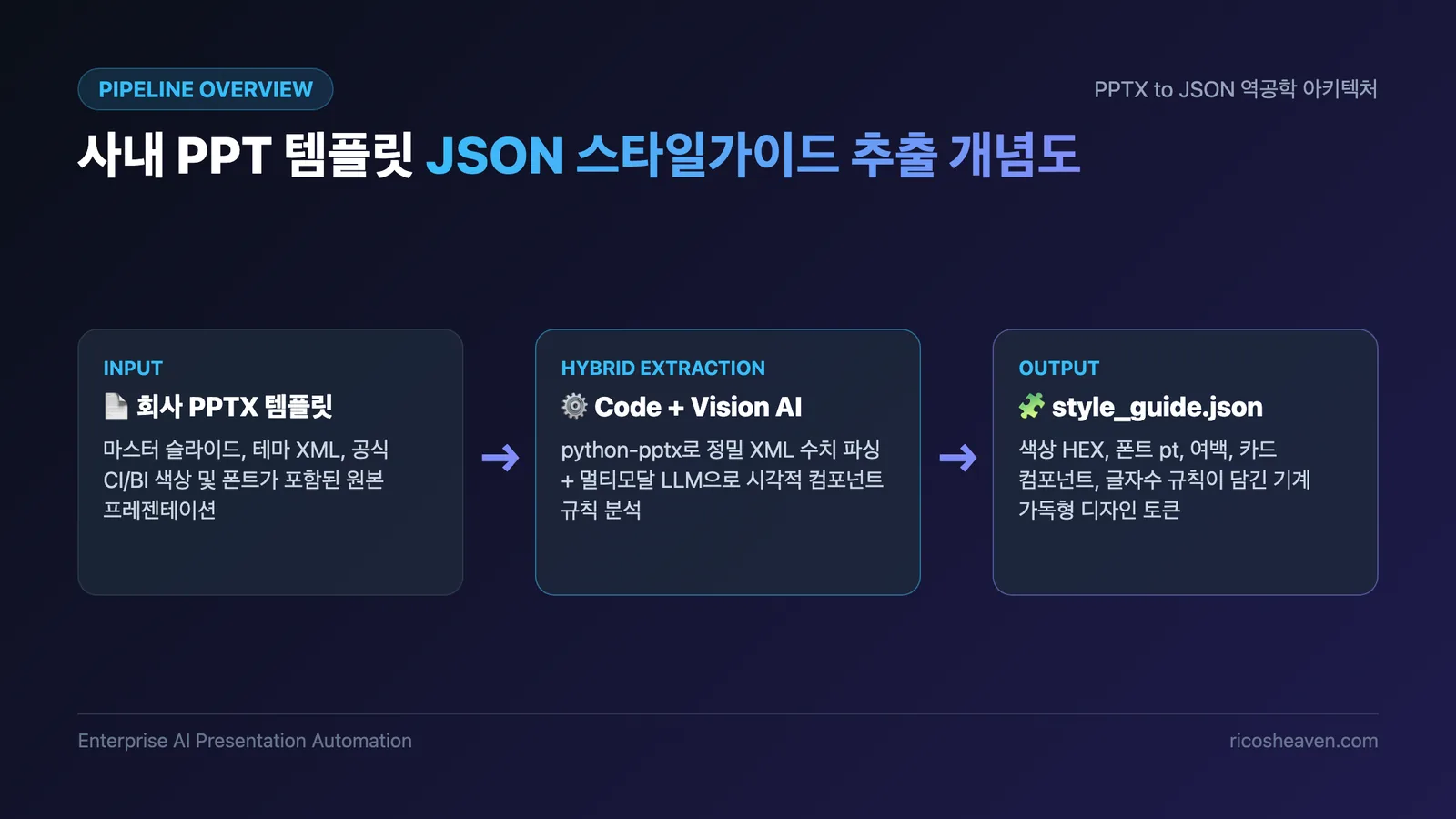
Translating Visual Intuition into Machine-Readable Tokens
While humans intuitively perceive "ample whitespace and navy blue accents," automated scripts and LLMs require concrete figures. By standardizing slide dimensions (16:9 = 960x540pt), safe margins, HEX color palettes, and pt-scale font hierarchies into JSON, AI pipelines can adhere to corporate brand rules without deviation. 💡
2. Hybrid Extraction Pipeline: Code + Vision AI
Under the hood, a .pptx file is an OpenXML ZIP archive.
The most accurate extraction combines programmatic XML parsing via python-pptx with semantic visual inspection using Multimodal Vision AI.
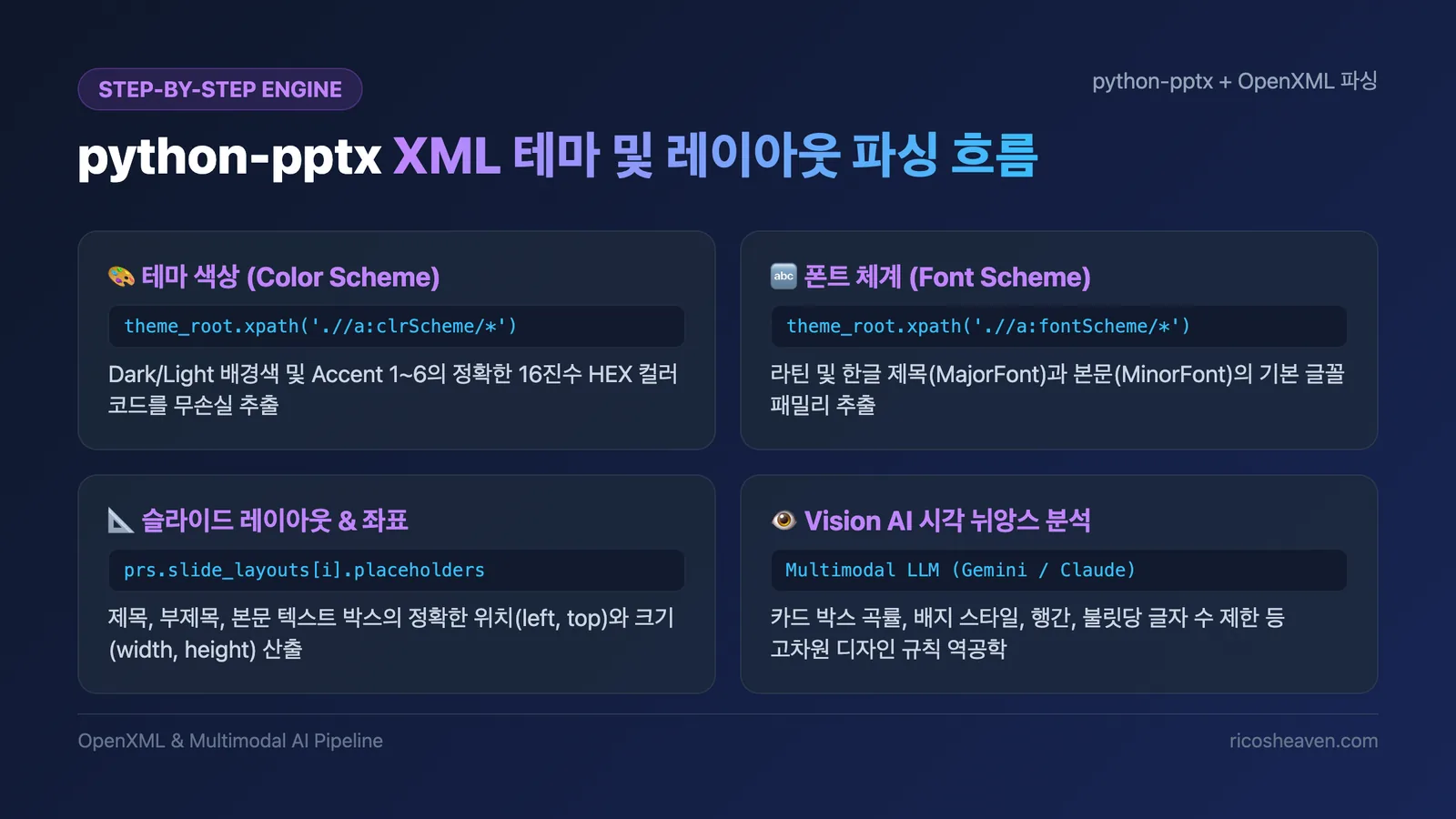
Step 1: Programmatic XML Parsing with python-pptx
First, python-pptx reads the presentation theme XML (ppt/theme/theme1.xml) directly:
- Theme Colors: Parsing the
a:clrSchemeelement retrieves exact HEX values for backgrounds, text, and Accent 1–6 colors. - Typography: Parsing
a:fontSchemecaptures default Latin and East Asian font families for headers and body copy. - Layout Coordinates: Inspecting placeholder shapes across slide masters extracts precise bounding box metrics (left, top, width, height).
Step 2: Reverse-Engineering Semantic Nuances with Vision AI
XML attributes alone cannot capture subtle design intentions like card corner radiuses, badge treatments, or optimal word count limits. Rendering slides to high-resolution PNGs and passing them to Multimodal LLMs (Gemini / Claude) extracts these high-level design heuristics.
3. Standard JSON Style Guide Schema
Consolidating both sources produces a standardized style_guide.json fully compatible with modern design token specifications:
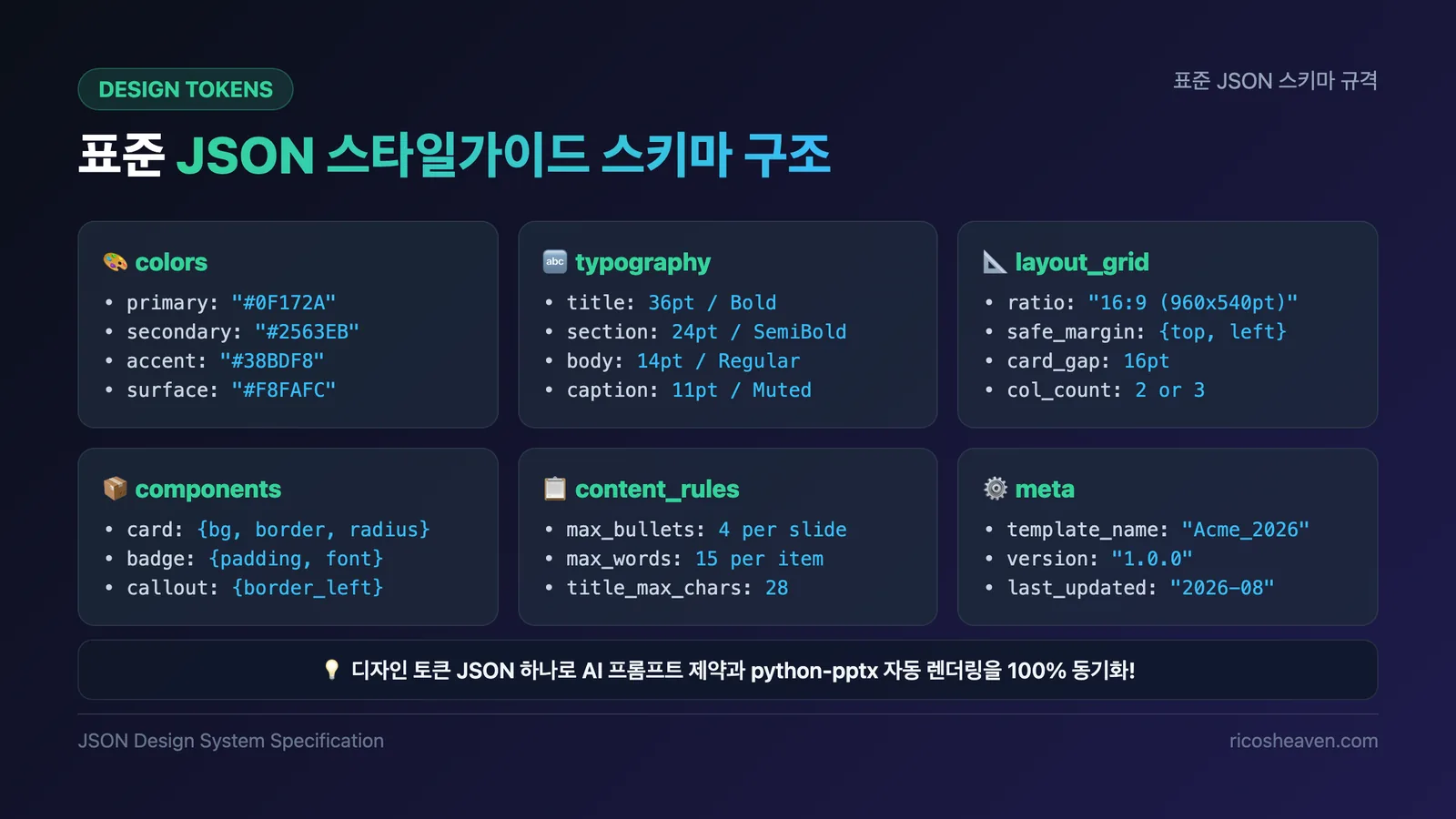
{
  "meta": {
    "template_name": "Acme_Corporate_2026",
    "aspect_ratio": "16:9",
    "slide_size": { "width_pt": 960, "height_pt": 540 }
  },
  "colors": {
    "primary": "#0F172A",
    "secondary": "#2563EB",
    "accent": "#38BDF8",
    "surface": "#F8FAFC",
    "text": { "primary": "#1E293B", "muted": "#64748B" },
    "border": "#E2E8F0"
  },
  "typography": {
    "title": { "fontFamily": "Pretendard", "sizePt": 36, "weight": 700, "color": "#0F172A" },
    "section": { "fontFamily": "Pretendard", "sizePt": 24, "weight": 700, "color": "#2563EB" },
    "body": { "fontFamily": "Pretendard", "sizePt": 14, "weight": 400, "lineHeight": 1.5, "color": "#1E293B" },
    "caption": { "fontFamily": "Pretendard", "sizePt": 11, "weight": 400, "color": "#64748B" }
  },
  "layout_grid": {
    "safe_margin": { "top": 48, "bottom": 48, "left": 56, "right": 56 },
    "card_gap": 16
  },
  "content_rules": {
    "max_bullets_per_slide": 4,
    "max_words_per_bullet": 15,
    "title_max_chars": 28
  }
}
4. Automated Slide Generation from JSON
This JSON style guide acts as the centralized brain for end-to-end AI report pipelines:
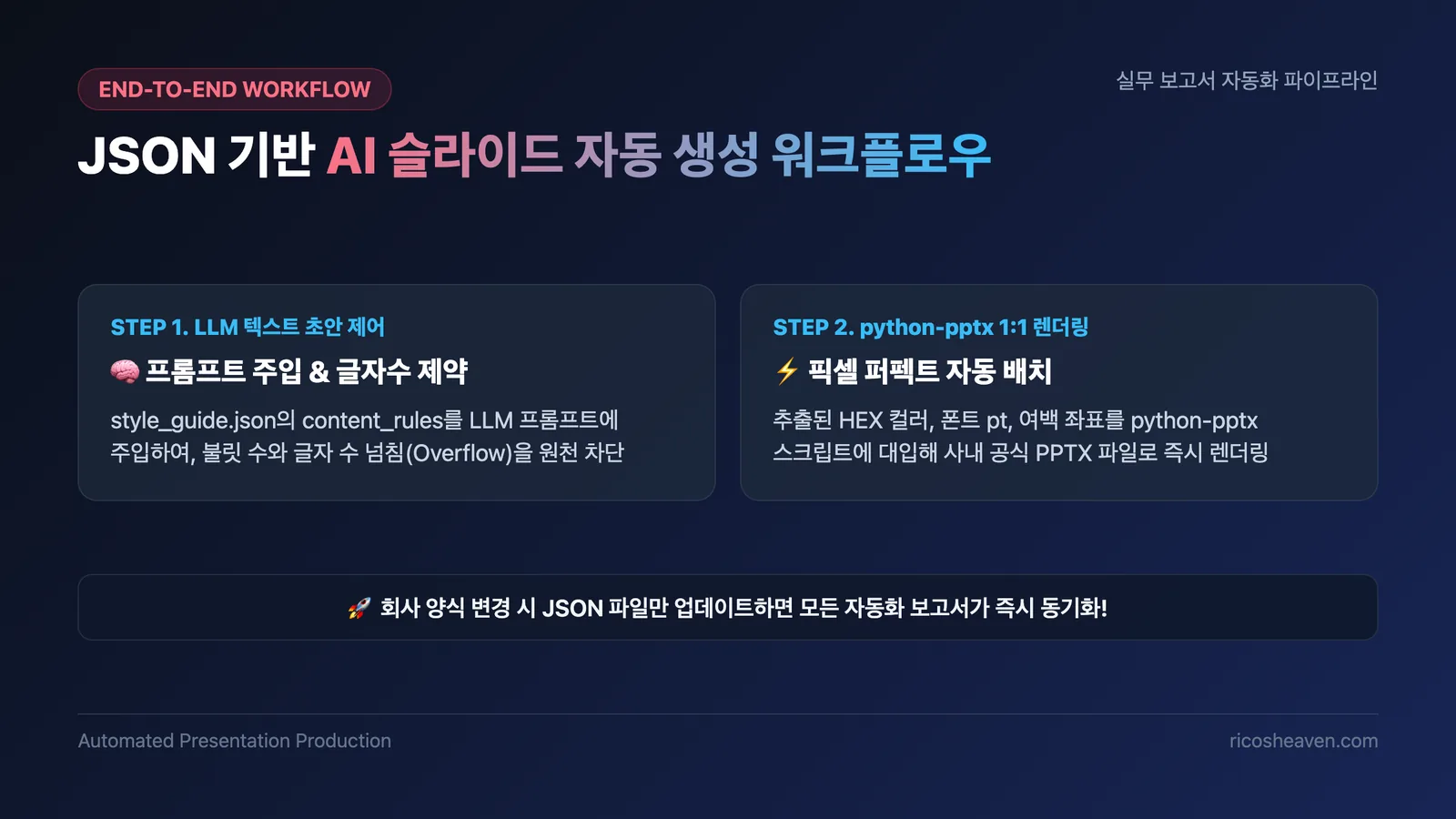
1) Preventing Text Overflows via LLM Constraints
Injecting content_rules into LLM system prompts ensures the AI respects strict constraints (e.g., "Max 4 bullets, under 15 words each"), completely eliminating unsightly text box overflows.
2) Pixel-Perfect python-pptx Rendering
Automated Python scripts read the structured content and apply the exact HEX colors, font sizes, and layout coordinates from style_guide.json to generate flawless corporate presentations in seconds. 🚀
5. Hands-on Code & Prompt Examples
Here is the complete, runnable Python code and prompt templates you can copy and deploy immediately.
Prerequisites
pip install python-pptx lxmlExample 1: Extracting Style Guide from PPTX (extract_style.py)
This script extracts theme colors (HEX), fonts, and slide dimensions from an existing PPTX template and exports them to JSON.
import json
from pptx import Presentation
from pptx.opc.constants import RELATIONSHIP_TYPE as RT
from pptx.oxml import parse_xml

def extract_pptx_style_guide(pptx_path: str, output_json: str):
    prs = Presentation(pptx_path)

    style_guide = {
        "meta": {
            "template_name": pptx_path.split("/")[-1].replace(".pptx", ""),
            "slide_size": {
                "width_pt": prs.slide_width.pt,
                "height_pt": prs.slide_height.pt
            }
        },
        "colors": {},
        "typography": {},
        "layouts": []
    }

    # 1. Parse Theme XML (Colors and Fonts)
    theme_part = prs.part.part_related_by(RT.THEME)
    theme_root = parse_xml(theme_part.blob)

    # Extract Theme Colors (a:clrScheme)
    for clr in theme_root.xpath('.//a:clrScheme/*'):
        tag_name = clr.tag.split('}')[-1]
        srgb = clr.xpath('.//a:srgbClr/@val')
        if srgb:
            style_guide["colors"][tag_name] = f"#{srgb[0]}"

    # Extract Theme Fonts (a:fontScheme)
    major_font = theme_root.xpath('.//a:fontScheme/a:majorFont/a:latin/@typeface')
    minor_font = theme_root.xpath('.//a:fontScheme/a:minorFont/a:latin/@typeface')
    if major_font:
        style_guide["typography"]["major_font"] = major_font[0]
    if minor_font:
        style_guide["typography"]["minor_font"] = minor_font[0]

    # 2. Extract Master Layout Placeholder Coordinates
    for idx, layout in enumerate(prs.slide_layouts):
        layout_item = {"index": idx, "name": layout.name, "placeholders": []}
        for ph in layout.placeholders:
            layout_item["placeholders"].append({
                "name": ph.name,
                "type": str(ph.ph_type),
                "left_pt": ph.left.pt,
                "top_pt": ph.top.pt,
                "width_pt": ph.width.pt,
                "height_pt": ph.height.pt
            })
        style_guide["layouts"].append(layout_item)

    with open(output_json, "w", encoding="utf-8") as f:
        json.dump(style_guide, f, indent=2, ensure_ascii=False)
    print(f"✅ Style guide extracted successfully: {output_json}")

if __name__ == "__main__":
    extract_pptx_style_guide("company_template.pptx", "style_guide.json")
Example 2: Vision AI Prompt for Semantic Refinement
Pass a sample slide screenshot along with the generated style_guide.json to a Multimodal LLM (Gemini / Claude) using this prompt:
[Role] You are an expert presentation design system engineer.
[Input] Attached corporate slide screenshot and raw style_guide.json.
[Instructions]
1. Analyze the 'Card' components in the image and define background colors, border styling, corner radiuses, and padding inside components.card.
2. Formulate strict content_rules (max bullet points, max words per line) to eliminate text overflow risks.
3. Output the finalized, complete style_guide.json as a JSON code block.
Example 3: Generating New Slides from JSON Style Guide (generate_slide.py)
This script loads style_guide.json and renders brand-compliant slides programmatically.
import json
from pptx import Presentation
from pptx.util import Pt, Inches
from pptx.dml.color import RGBColor

def hex_to_rgb(hex_str: str) -> RGBColor:
    hex_str = hex_str.lstrip("#")
    return RGBColor(*(int(hex_str[i:i+2], 16) for i in (0, 2, 4)))

def generate_report_from_style_guide(guide_path: str, output_pptx: str):
    with open(guide_path, "r", encoding="utf-8") as f:
        guide = json.load(f)

    prs = Presentation()
    prs.slide_width = Pt(guide["meta"]["slide_size"]["width_pt"])
    prs.slide_height = Pt(guide["meta"]["slide_size"]["height_pt"])

    # 1. Add blank slide
    blank_layout = prs.slide_layouts[6]
    slide = prs.slides.add_slide(blank_layout)

    # 2. Apply typography & color tokens
    primary_color = hex_to_rgb(guide["colors"].get("accent1", "#0F172A"))
    font_name = guide["typography"].get("major_font", "Pretendard")

    # 3. Position Title Box
    title_box = slide.shapes.add_textbox(Inches(0.8), Inches(0.8), Inches(11.7), Inches(1.0))
    tf = title_box.text_frame
    p = tf.paragraphs[0]
    p.text = "Q3 2026 AI Business Performance Report"
    p.font.name = font_name
    p.font.size = Pt(32)
    p.font.bold = True
    p.font.color.rgb = primary_color

    prs.save(output_pptx)
    print(f"🎉 Corporate compliant report generated: {output_pptx}")

if __name__ == "__main__":
    generate_report_from_style_guide("style_guide.json", "quarterly_report.pptx")
Summary
- Accuracy: Combining XML parsing with Vision AI replicates corporate branding with zero fidelity loss.
- Reusability: A standardized JSON schema integrates effortlessly across Python renderers and LLM prompt pipelines.
- Productivity: Eliminates manual formatting, enabling developer and business teams to generate compliant executive reports automatically.
Extracting design tokens into JSON permanently solves the presentation formatting bottleneck. Whenever corporate branding updates, re-running the extraction script immediately synchronizes all downstream automation tools.